


New
Are you ready for Agentforce? Take our assessment to find out today!
    • Expertise
          • Product

          • Sales Cloud
          • Service Cloud
          • Account Engagement
          • Marketing Cloud Next
          • Revenue Cloud
          • Agentforce
          • Data 360 (Data Cloud)
          • CRM Analytics
          • Tableau Next
          • Experience Cloud
          • Industry

          • Manufacturing
          • Healthcare
          • High Tech
          • Financial Services
          • Media & Entertainment
    • Solutions
      • Consulting
      • Implementation
      • Managed Services
      • Health Check
      • Training
    • About Nebula
      • We Are Nebula
      • Meet the Team
      • Join Our Team
    • Resources
    • Login
    • Get in Touch
Share:

How to Master the Lightning Landing Page Builder

by Dorottya Dvorak
11th July 2022 • 3 min read
Dorottya Dvorak
Share:

The drag-and-drop Lightning Landing Page Builder, also known as the Enhanced Landing Page Experience, has been available since the Winter ’22 Release following high demand. The new editor brings a whole new user experience, and the transition from the classic editor can be tricky. Fear not! I’m here to help you master this great tool.

Before you dive into the specifics, take a look at our overview and make sure the feature is set up in your org. Are you all set? Then let’s look at my tips and recommendations:

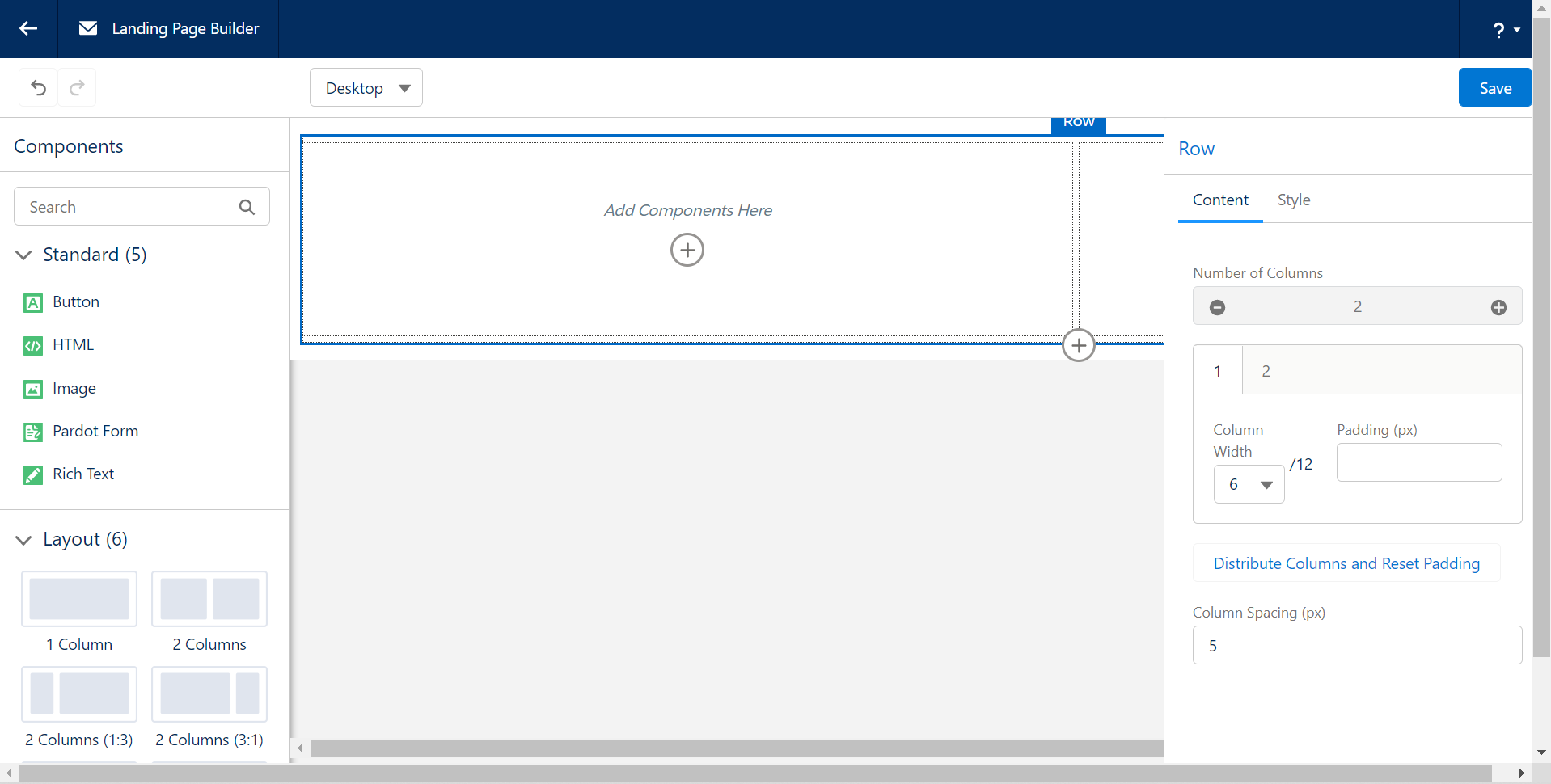
Work on a large screen

There are so many great things in the Landing Page Builder that it simply can’t fit into a small window. Unfortunately, when you work in the editor, the different sections pile up and a scroll appears, making the editing process less than ideal.
lightning landing page editor

Until that user experience is changed, I’d recommend opening the builder on a larger screen or zooming out in your browser.

Control your resized images

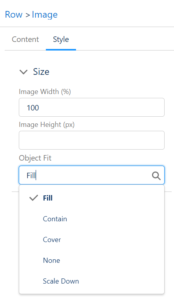
With the new builder, it is super easy to define how the images should resize on smaller screens. No need to code it in the HTML section, but you should be aware of what the different options mean exactly:

  • Flightning landing page editorill: This is the default. The image is resized to fill the given dimension. If necessary, the image will be stretched or squashed to fit the space.
  • Contain: The image will keep its aspect ratio, but is resized to fit within the given dimension.
  • Cover: The image will its aspect ratio and fills the given dimension. The image will be clipped to fit.
  • None: The image is not resized.
  • Scale Down: The image is scaled down to the smallest version of none or contain.

(Source: w3schools.com)

The next time you work in the builder, have a play with this section to see a live example and select the option that suits the purpose of the image.

Divide your columns and they will conquer
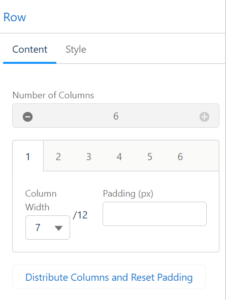
lightning landing page editorThe layout components are using a maximum of 12 column system (influenced by Bootstrap) which counts as the 100% width of that section. Use that as a scale to set the width of the different columns.

You can easily create a layout component with up to 6 columns by clicking on the + icon on the right-hand side. Then you can set the width of each column one by one, or click on the ‘Distribute Column and Reset Padding’ link to have a consistent layout.

Style your form with a stylesheet

Although you have a Style section on the Pardot form component, for consistency and better user experience I recommend an alternative. Instead, ask your design team – or our brilliant consultants – to create a stylesheet document that you can depend on.

Once the file is created and uploaded to Pardot, you can reference it in two places:

  • In the Builder, in an HTML component.
  • In the Landing Page component’s Settings view, under the Header section.

That will control all your form styling attributes in one central place, which will make maintenance much easier.

Tell me more…

Well, we have plenty more insights about the Lightning Landing Page Builder that we share with our community. If you are keen to learn more, get in touch with our team – we’d love to hear from you.

Find related resources by topic

Marketing

You may also be interested in

Fix the Foundations: Success in the Agentic Era Marketing Edition
Blog
Marketing

Fix the Foundations: Success in the Agentic Era Marketing Edition

We hear the announcements and on repeat about how the Agentic Era is here to transform the B2B and B2C landscapes. These changes will enable…

4 min read Read Blog
Laying the Right Foundations
Success Story
Account Engagement Sales Cloud

Laying the Right Foundations

Complex processes and cautious stakeholders hindered Redwheel's CRM adoption. Nebula's Account Engagement and Salesforce audits mapped the journey, restoring confidence and delivering a strategic roadmap for a powerful, sales-enabled CRM.

May 27, 2025 Read Customer Story
How to Avoid Completion Action Limits in Account Engagement (Pardot) Using Engagement Studio
Blog
Marketing

How to Avoid Completion Action Limits in Account Engagement (Pardot) Using Engagement Studio

Conditional completion actions and completion actions, while powerful, can quickly consume the available limits on your forms and form handlers. If you’ve been creating and managing…

3 min read Read Blog
Aligning Marketing and Sales for a Global Insurer
Success Story
Account Engagement Sales Cloud

Aligning Marketing and Sales for a Global Insurer

Poor email deliverability and disconnected data misaligned Lockton's sales and marketing. Nebula's Salesforce and Account Engagement integration established governance, delivering a 97% delivery rate, 25 empowered users, and transparent insights.

Apr 30, 2025 Read Customer Story
Upgrade Your Form UX with Toggle Switches
Blog
Marketing

Upgrade Your Form UX with Toggle Switches

If you would like to modernise your forms, provide a slicker user experience, and match contemporary web design, follow our mini guide that helps you…

2 min read Read Blog
Creating a seamless membership experience
Success Story
Account Engagement Sales Cloud Service Cloud

Creating a seamless membership experience

Data silos and disparate systems hindered the World Travel and Tourism Council's membership experience. Nebula's Cvent integration, record cleansing and automated invoicing delivered rapid efficiency, unified data, and a 10-year partnership.

Jan 30, 2025 Read Customer Story
Account Engagement Landing Page Conversion Mastery
Blog
Marketing

Account Engagement Landing Page Conversion Mastery

Building pages that truly perform in Account Engagement isn't just about clicking buttons; it's about strategy, technical finesse, and empathy for the user. Here’s my…

5 min read Read Blog
Targeted Sales Enablement for Users
Success Story
Account Engagement CRM Analytics Sales Cloud

Targeted Sales Enablement for Users

Stale opportunities and missing data delayed Clarion Events' pipeline. Nebula's Einstein Next Best Action delivered intuitive guidance, surging stage moves by 132%, doubling activities, capturing crucial VAT details, and boosting CRM adoption.

Jan 3, 2025 Read Customer Story
5 Hidden Snags in Account Engagement
Blog
Marketing

5 Hidden Snags in Account Engagement

Managing Salesforce Account Engagement (Pardot) requires more than just marketing knowledge. Even in a well-established org, you can sometimes hit some invisible walls. Below are…

4 min read Read Blog
5 new Marketing Cloud Next features we’re excited to try
Blog
Marketing

5 new Marketing Cloud Next features we’re excited to try

The Spring ’26 release is here, and it’s a significant milestone for Marketing Cloud Next (also known as Agentforce Marketing). This release focuses on making…

4 min read Read Blog
Nebula

Our journey started in 2012 with a clear vision and core values. Nebula is dedicated to empowering our customers through fostering relationships founded on collaboration, flexibility, and trust.

  • We Are Nebula
  • Resources
  • Join Our Team
  • Terms and Conditions
  • Privacy Policy
The Space Aldgate,
Irongate House,
22-30 Dukes Place,
London EC3A 7LP
+44 207 112 8026
Get in Touch
Copyright © 2026 Nebula Consulting. All Rights Reserved.