


Scoring may be a familiar tool to most that use Account Engagement (Pardot), but is it utilised to its full potential? Then there’s Scoring Categories, a subset score based on specific content engagement. Can it benefit your business and add to better quality sales assigned leads?
If you’re not yet leveraging scoring rules, you can find our blog post here on reasons why you should consider this. If you’re ready for the next steps or looking for ideas, use cases and how to refine these processes, read on!
Scoring rules
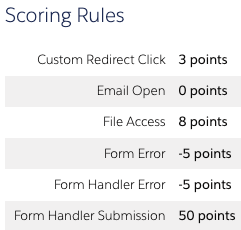
Scoring applies a numeric value to your prospects based on certain activities such as; email clicks, page visits, webinar registration, etc. From this, you can create automation rules, dynamic content, lists, email nurtures, and most commonly, lead assignment processes.
Scoring rules are found under your Pardot settings > Automation settings > Scoring in the Lightning app. In the classic Pardot it’s located under Admin > Automation settings. There you can check on your existing scoring rules along with any changes users have made. Located under the ‘Scoring rule changes’ section (which is great for auditing and refinement).
Getting started
Before you start changing the scoring already in place, you want to plan. It can be of benefit to create a living document noting down:
- Existing rules, values, and automation associated with these rules (automation rules/ dynamic content)
- Why are these values what they are
- Any reasons for changing them, and how changing them may impact certain functionality
This can help you in the future when onboarding new staff and when reviewing these rules at a later date.
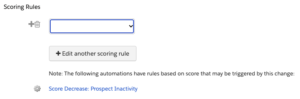
Thankfully AE provides you with some quality-of-life tools to help you with this. If you click on “edit scoring rules” you may notice some entries below alerting you to automation rules that could be affected.
A score degradation strategy could also benefit your business, which you can read more about on our blog here.
You then want to start asking questions like; “what is a quality lead to the business?”. Reaching out to some of your sales team at this stage can be beneficial. Asking them these sorts of questions and collecting their feedback. After all, they are the ones contacting them. This information is invaluable as you start to build a better picture of what trends sales see in more engaged leads and incorporate this into your scoring rule strategy.
For example; you may have scoring rules that apply high scores to email clicks, but in reality, your sales teams are noticing that leads who are submitting your forms are converting more often and email engagement isn’t providing them with good leads.
All of this comes together to provide the foundation for a robust scoring strategy. Over time you will want to refine, test and report on what is and isn’t working.
Scoring Categories
Scoring categories on the other hand, are slightly different and can provide you with more granular scoring and engagement reporting. Along with the overall score of a prospect, AE will then break down prospects’ engagement in the categories you’ve created.
Not every function may find scoring categories of benefit. That being said, it’s good to know what they are and how to leverage this feature to spot potential opportunities to implement.
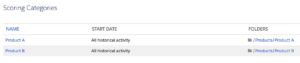
This subset of scoring is based on assets that are saved in a particular folder/s. So before you create any scoring categories, make sure that your folder structure is robust and well organised. You can set a scoring category to any parent folder or subfolder. However, if you have a parent folder assigned to a category, you can’t then assign another category to one of its subfolders.
An example could be that your business sells 2 different products or services. You want to keep track of prospects’ engagement across these individual products/ services. Scoring categories are a good fit. It’s all well and good to have a prospect’s overall score. But having a score based on a specific product highlights what they are interested in more immediately. This can then be used to provide further tailored marketing content, amplify your lead assignment and provide sales teams with additional context by displaying scoring categories on the Salesforce pages.
So how do I do that?
Again, structured folders are the foundation for accurate category scoring, coupled with assessing your existing scoring rules. Any assets that sit under a folder that’s been assigned a scoring category will be scored separately. Engagement of content outside of these folders will accrue to the prospects’ overall scoring.
With your folders organised, it’s simply going back to the Scoring setting in Pardot and clicking “add a scoring category”. Give it a name, choose your folder and set the date you want to enable the scoring category or choose ‘all time’. The scoring that applies to these categories is the same as your general scoring. You can’t set different scoring rules per category, but you can create automation rules or page actions that does this for you instead. When prospects engage with these categories you will find their score updates on their prospect record under ‘insight’. If they have 0, then the category won’t display.
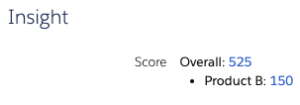
There are some caveats to scoring categories worth noting:
- Assets deleted in folders assigned to a category will then recalculate prospect scores accordingly
- You are limited to 50 scoring categories
- You can assign a single scoring category to multiple folders, but a folder can only have the one category
- If a form is on a landing page, the folder that the landing page sits in will be the category applied on form completion
***
In summary, as with most changes you want to: plan, collaborate, test, analyse and refine your strategy over time! Feel free to get in touch with us here at Nebula if you’d like support with planning and implementing your Lead scoring strategy.