


Conditional completion actions and completion actions, while powerful, can quickly consume the available limits on your forms and form handlers. If you’ve been creating and managing forms for a while, you’re likely aware of these limits, but if not, these are a maximum of 15 total completion actions or 6 conditional groups per form or form handler. These limits could force marketing teams to adopt more effective methods to manage form submissions and processing. Continue reading to avoid reaching platform limits on form completion actions.
Firstly, to move past these limitations, there is a need to:
- Identify completion actions that are used most frequently across your lead generation forms.
- Define an automated process that facilitates the required completion actions outside of the form’s limited scope.
Identifying Completion Actions
The not-so-fun part will be conducting a thorough review of your forms and the completion actions that are being leveraged. Export your form report from Account Engagement and begin to note down each action present on your forms/form handlers.
You can do this in excel, in a word document or another process/tool that helps you with this first part.
Examples of common completion actions could be:
- Setting a Lead Source based on a specific form submitted
- Sending an autoresponder but with dynamic content for personalised experiences if they have accepted your data privacy policy (perhaps you could even encourage newsletter sign ups!)
- Populating missing values on key/core fields if you have collected relevant information on the preceding form
Defining an Automated Process
Once you have identified commonly used completion actions, you will be able to free up space on your forms to include only true form-specific completion actions on each form. With this, we will be using a repeatable engagement studio program, as these tools can be utilised for much more than just nurture programs.
Introduce a Date Field: Create a dedicated Account Engagement date field (i.e. Most Recent Form Submission Date). This is the key to identifying recent activity.

Create a Dynamic Entry List: Build a dynamic list that has the criteria for prospects where the ‘Form Submission Date’ is today. This instantly identifies all prospects who have recently submitted a form and will require the relevant completion actions to be submitted

Build an Engagement Program: Create an engagement studio program that uses this dynamic list as its entry criteria. This program will house all the consolidated, common completion actions.
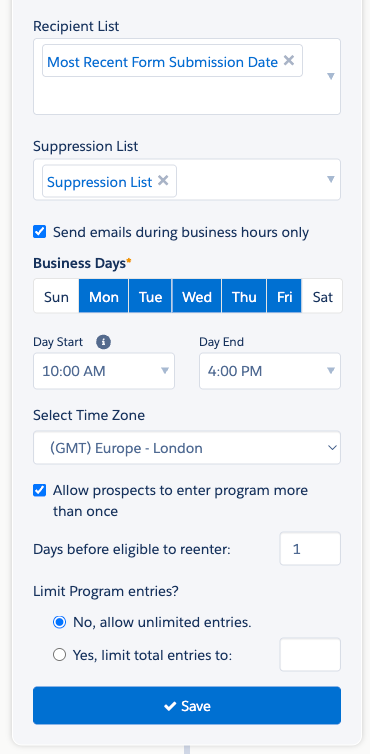
By implementing this new design, you can effectively consolidate your commonly used completion actions, keep your forms clean, and future-proof your marketing operations against platform limits. This allows operational changes to be managed in one location rather than editing every individual form.
Considerations:
- Any prospect data from offline marketing or imports will not be part of this automated process (unless you want to incorporate this into the process!).
- The new date field will be updated upon each new form submission, ensuring the engagement studio processes the most recent activity.
- If a prospect submit multiple forms in one day, they will only join and be processed by the program once, based on the first submission.
- Review if the new date field should be available in your CRM platform for reporting and tracking purposes.


