

New
Are you ready for Agentforce? Take our assessment to find out today!
    • Expertise
          • Product

          • Sales Cloud
          • Service Cloud
          • Account Engagement
          • Marketing Cloud Next
          • Revenue Cloud
          • Agentforce
          • Data 360 (Data Cloud)
          • CRM Analytics
          • Tableau Next
          • Experience Cloud
          • Industry

          • Manufacturing
          • Healthcare
          • High Tech
          • Financial Services
          • Media & Entertainment
    • Solutions
      • Consulting
      • Implementation
      • Managed Services
      • Health Check
      • Training
    • About Nebula
      • We Are Nebula
      • Meet the Team
      • Join Our Team
    • Resources
    • Login
    • Get in Touch
Share:

Pardot now allows SSL-enabled URLS – but use with caution!

by Nebula Consulting
13th July 2018 • 4 min read
Nebula Consulting
Share:

You can now make your Pardot assets secure with an SSL certificate – which means your content can be hosted on https urls. This long awaited feature is good news for your search rankings as this has become an important indicator for Google to confirm whether content is secure for their users.

But it’s also good news for your prospects, who are becoming ever more security conscious online. Anyone using Chrome as their default browser may have noticed that you constantly get served with security warnings before loading an unsecure page, so this switch gives our prospects more confidence about how seriously you’re taking their online security.

So it’s a no brainer that you would switch to using SSL-enabled tracker domains for your Pardot assets, but don’t rush into switching them over just yet. Read on to find out why.

Ready…

So what to do if you want to make the switch? First of all, you’ll need to validate your tracker domain by following the steps below:

  1. Copy the domain’s validation key from the Tracker Domain table in Pardot.
  2. Set up a TXT record with an empty host, or the at (@) symbol if empty host isn’t allowed.
  3. Paste the domain’s validation key into the TXT record.
  4. Wait 24 hours for your DNS to take effect.
  5. Go back to your Domain Management in Pardot, click the gear icon alongside your tracker domain and click Validate.

More detailed instructions are included here, or watch our run-through below:

Once validated, your tracker domain can then be enabled for SSL. Navigate to Admin > Domain Management, edit your tracker domain and click Enable SSL:
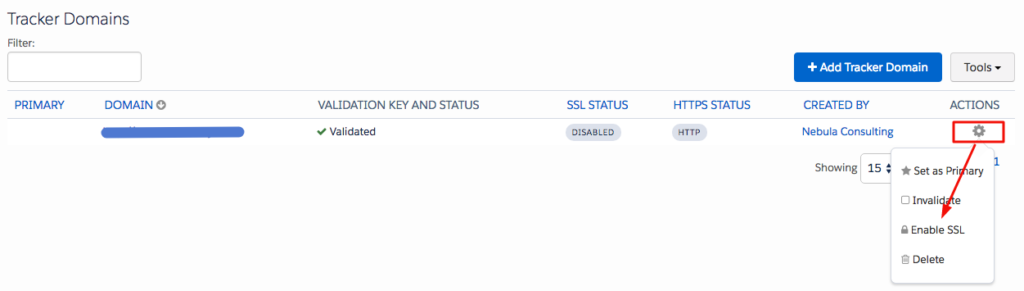
How to SSL-enable domains in Pardot
It might take up to 15 minutes for the SSL status column to switch from Processing to Enabled.

…Steady…

Here’s the part where you need to use SSL-enabled tracker domains with caution. You can set your tracker domains to https by default, which means Pardot will generate all of your URLs starting with https. But before you do, you will want to ensure that your current pages are not using any content which is not secure – this means things like links to CSS stylesheets, javascript, custom fonts, images and anything else you have embedded on your pages. If these links aren’t using https urls and you switch your page to https then they won’t be served, which could dramatically affect the look and behaviour of your Pardot landing pages.

You can see if using https is going to be a problem for your landing pages by first of all checking your layout templates and see if any of your content is currently served over non-secure http links. If they are, switch them to https (which should be fine if  your content is hosted on your website and your website is SSL-enabled) and if they’re not, find a secure location for them. You can also test an existing landing page by copying your URL in Pardot (which will be http by default) and adding https to the start of the URL when you paste it into your browser. Load the page and look for any obvious issues with rendering or functionality of the page.

If there are issues serving your content over https or you have several layout templates and landing pages in use, you might want to enlist the help of your web team to test thoroughly!

…Go!

Once you’re happy there are no cases of mixed content on your landing pages, you can set SSL-enabled as the default for your account so that all of your Pardot links are automatically generated as https.
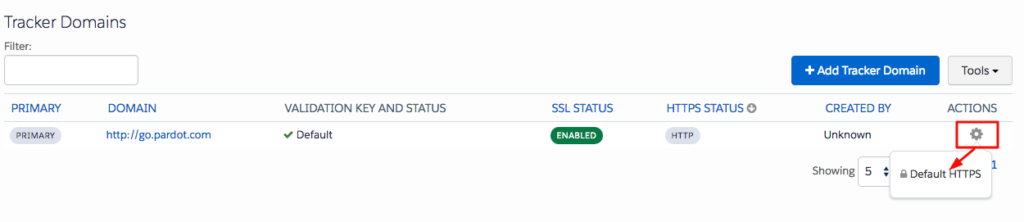
SSL-enabled domains - default to https

And that’s it… it’s a great feature from Pardot but if you are already making substantial use of Pardot landing pages and have several layout templates in use then it is worth spending the time testing it out first before you enable SSL across your Pardot account. And if you don’t use Pardot landing pages, don’t forget that this might also affect pages such as the unsubscribe page or your email preference center!

If you have any questions, please don’t hesitate to contact us here so we can help you navigate the world of SSL-enabled content in Pardot.


Find related resources by topic

Marketing

You may also be interested in

Fix the Foundations: Success in the Agentic Era Marketing Edition
Blog
Marketing

Fix the Foundations: Success in the Agentic Era Marketing Edition

We hear the announcements and on repeat about how the Agentic Era is here to transform the B2B and B2C landscapes. These changes will enable…

4 min read Read Blog
Laying the Right Foundations
Success Story
Account Engagement Sales Cloud

Laying the Right Foundations

Complex processes and cautious stakeholders hindered Redwheel's CRM adoption. Nebula's Account Engagement and Salesforce audits mapped the journey, restoring confidence and delivering a strategic roadmap for a powerful, sales-enabled CRM.

May 27, 2025 Read Customer Story
How to Avoid Completion Action Limits in Account Engagement (Pardot) Using Engagement Studio
Blog
Marketing

How to Avoid Completion Action Limits in Account Engagement (Pardot) Using Engagement Studio

Conditional completion actions and completion actions, while powerful, can quickly consume the available limits on your forms and form handlers. If you’ve been creating and managing…

3 min read Read Blog
Aligning Marketing and Sales for a Global Insurer
Success Story
Account Engagement Sales Cloud

Aligning Marketing and Sales for a Global Insurer

Poor email deliverability and disconnected data misaligned Lockton's sales and marketing. Nebula's Salesforce and Account Engagement integration established governance, delivering a 97% delivery rate, 25 empowered users, and transparent insights.

Apr 30, 2025 Read Customer Story
Upgrade Your Form UX with Toggle Switches
Blog
Marketing

Upgrade Your Form UX with Toggle Switches

If you would like to modernise your forms, provide a slicker user experience, and match contemporary web design, follow our mini guide that helps you…

2 min read Read Blog
Creating a seamless membership experience
Success Story
Account Engagement Sales Cloud Service Cloud

Creating a seamless membership experience

Data silos and disparate systems hindered the World Travel and Tourism Council's membership experience. Nebula's Cvent integration, record cleansing and automated invoicing delivered rapid efficiency, unified data, and a 10-year partnership.

Jan 30, 2025 Read Customer Story
Account Engagement Landing Page Conversion Mastery
Blog
Marketing

Account Engagement Landing Page Conversion Mastery

Building pages that truly perform in Account Engagement isn't just about clicking buttons; it's about strategy, technical finesse, and empathy for the user. Here’s my…

5 min read Read Blog
Targeted Sales Enablement for Users
Success Story
Account Engagement CRM Analytics Sales Cloud

Targeted Sales Enablement for Users

Stale opportunities and missing data delayed Clarion Events' pipeline. Nebula's Einstein Next Best Action delivered intuitive guidance, surging stage moves by 132%, doubling activities, capturing crucial VAT details, and boosting CRM adoption.

Jan 3, 2025 Read Customer Story
5 Hidden Snags in Account Engagement
Blog
Marketing

5 Hidden Snags in Account Engagement

Managing Salesforce Account Engagement (Pardot) requires more than just marketing knowledge. Even in a well-established org, you can sometimes hit some invisible walls. Below are…

4 min read Read Blog
5 new Marketing Cloud Next features we’re excited to try
Blog
Marketing

5 new Marketing Cloud Next features we’re excited to try

The Spring ’26 release is here, and it’s a significant milestone for Marketing Cloud Next (also known as Agentforce Marketing). This release focuses on making…

4 min read Read Blog
Nebula

Our journey started in 2012 with a clear vision and core values. Nebula is dedicated to empowering our customers through fostering relationships founded on collaboration, flexibility, and trust.

  • We Are Nebula
  • Resources
  • Join Our Team
  • Terms and Conditions
  • Privacy Policy
The Space Aldgate,
Irongate House,
22-30 Dukes Place,
London EC3A 7LP
+44 207 112 8026
Get in Touch
Copyright © 2026 Nebula Consulting. All Rights Reserved.