


A key aspect of a successful revenue management tool is having a seamless user experience for sales reps so that the system does not become a blocker and slow them down. For sales reps selling multi-year deals, Salesforce ARM (formerly Revenue Cloud/RCA) has just made this even easier by introducing new functionality for creating Ramped Deals & Schedules.
Previously, reps would need to create groups one by one for each year of a Ramped Deal, and then add the products to each of these groups. This created a lot of additional clicks for sales reps and increased the time it would take to create a quote.
In the Summer ‘26 release, Salesforce has introduced a new button called ‘Create Ramped Schedule’, which provides a new OOTB UI for creating Ramped Deals via a guided flow. Upon clicking this button, reps will see the new UI where they will be able to create the multi-year deal from a single screen, as seen below:
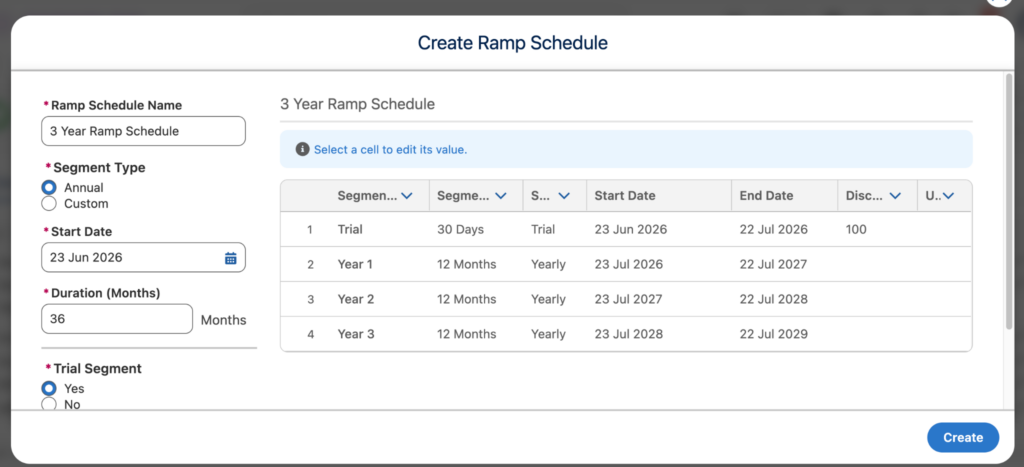
From this screen, reps can easily select when the deal will start and the duration, including any trial periods if required. Once the rep clicks on the Create button, the system will then automatically create each segment as a separate group which aligns with the information entered in the Create Ramp Schedule screen. This reduces the clicks for the rep as they do not need to manually create each group/segment.
With this new functionality enabled, reps can now also choose whether to add products across all segments or to an individual. By clicking Browse Catalogues on one of the segments in the transaction line editor, a new screen will appear where the reps can select how they would like to add products to their quote:
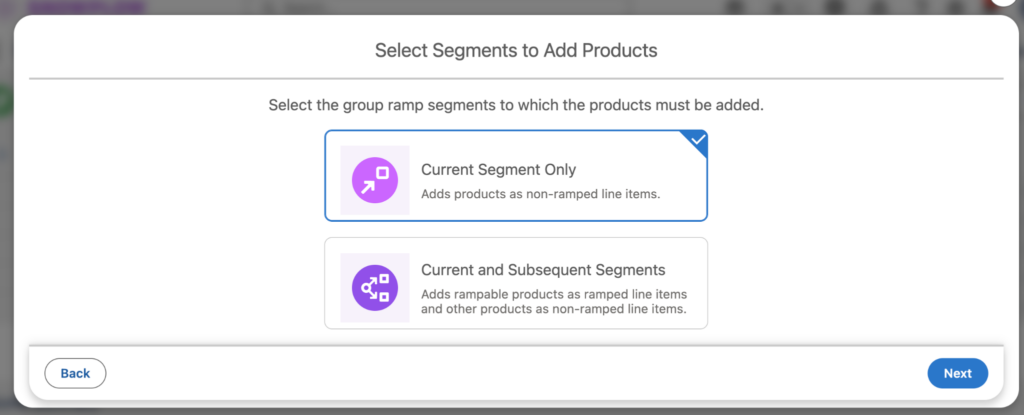
This new functionality is another great time saver for reps that allows them to quickly build their quote out by adding products across the whole Ramped Deal at once.
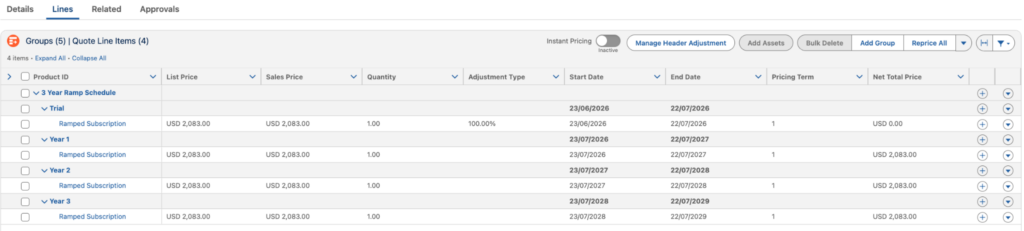
The Summer ‘26 release has brought many great updates to Salesforce Agentforce Revenue Management (ARM), especially for Ramped Deals, as the new release also introduced early renewals for these. ARM was already a powerful tool, and these new updates bring additional improvements to improve user experience and reduce clicks for users, all while utilising OOTB functionality that can be enabled in just a few clicks.
If you are interested in finding out more about Salesforce Agentforce Revenue Management (ARM), or are looking to transition from Salesforce CPQ to ARM, then get in touch with our Revenue Management experts today, and let us help you succeed in your journey.