


Pardot sandboxes have been available to accounts using Advanced or Premium since the Summer ’20 release. This seemed to herald a shift towards better development best practices when using Pardot. It came alongside other features to more closely align administration of Pardot and Salesforce.
Testing complex automation that could potentially impact thousands of prospects before setting it live seems like a no-brainer, right?
But there are many considerations that could easily catch you out if you dive right in expecting the same functionality as a Salesforce sandbox. So, let’s dig into the detail (pun intended…) and explore when you should use a Pardot sandbox and when you should steer clear.
The Basics
First up, let’s familiarise ourselves with the basics of Pardot Sandboxes:
- Available for Advance or Premium customers
- 1 Pardot Sandbox is available for every Business Unit (Advanced comes with 2 as standard and Premium has 5)
- Pardot Sandboxes have no deployment capability; you must manually recreate all changes
- Email sending is entirely disabled in Sandboxes (even automated emails)
- B2B Marketing Analytics, Engagement History Dashboards and Salesforce Engage are disabled in Sandboxes
- Once a Pardot Sandbox is created, the only way to remove it is to refresh the Salesforce sandbox.
When to use a Pardot Sandbox
This seems like a lot of “can’t”s and “don’t”s, but there are some really great use cases for Pardot Sandboxes:
- Permissions & Visibility – if you are using Selective Syncing for the Pardot-Salesforce connector, or have a complex sharing model, it is a great idea to test out any custom profiles or permissions sets in a Sandbox to ensure you have your visibility spot on.
- Marketing Data Sharing Rules – when using multiple Business Units, it’s a good idea to test that prospect data flows into the correct Business Unit from Salesforce.
- Campaign Management – configuring Connected Campaigns or customising the Campaign object in Salesforce could have a downstream impact on other areas of the CRM, so best to test it in a safe place first.
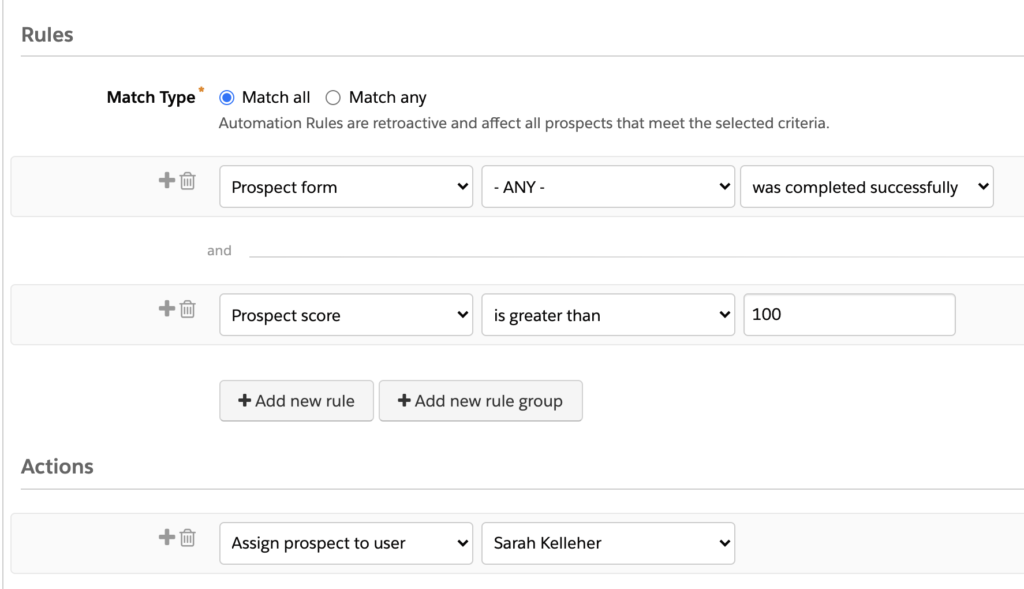
- Lead Qualification – ensure your scoring and grading, lead assignment rules or MQL processes are working correctly without bombarding Sales with incorrect tasks or notifications.
- Salesforce Page Layouts – evaluate the UX of any sales-facing Pardot components (Engagement History etc.) to make sure they’re super user-friendly and relevant.
- System integrations – test out any API-led integrations with third-party platforms without creating test data in your production Pardot environment.
- Custom Objects – practice your segmentation with custom object data using test data.
Essentially, a Pardot Sandbox environment is a great place to test any automated data processing or the integration with Salesforce. Bear in mind that sync times are *much* slower in Sandboxes. If it seems like something hasn’t worked, go have a cup of tea and check back on it later!
When not to use a Pardot Sandbox
Sorry to any Salesforce admins in the room who feel uneasy right now. But, there are quite a few cases where it makes far more sense to build straight in Pardot Production. The lack of deployment tools and email capability in Pardot is a huge constraint on their usefulness. To avoid duplicating your workload, it’s best to avoid using a Pardot sandbox in these cases:
- Anything involving Email – all email sending, including tests and previews is disabled in Sandboxes. This means testing dynamic content in autoresponders, proofing List Emails and checking Engagement Studio sends will not work at all.
- Einstein and B2B Marketing Analytics – some of the more advanced features, including analytics and Engagement History Dashboards are not enabled for Sandboxes so these cannot be previewed.
- Time-sensitive process flows – sync times for Sandboxes are really slow. REALLY slow. Testing things like lead assignments, user sync or connected campaigns won’t give you an accurate indication of speed.
- Testing or designing content – you must manually recreate any Sandbox assets in your Production environment, so you could end up duplicating your efforts unnecessarily.
- Multi-stage deployment process – if your Salesforce development cycle involves multiple sandboxes (Dev, functional testing, UAT etc.), then you may be tempted to align Pardot to each of those. But you will need to manually recreate your changes in each environment which is a huge amount of work!
Gotchas
There are a couple of little things to know about using Pardot Sandboxes that you are very unlikely to find out until you stumble across them when something isn’t working. To save you the headache, I’ve shared some of the things I’ve bumped into here:
- Refreshing a Salesforce sandbox deletes the Pardot sandbox attached to it. Do make your Salesforce administrator aware of this so they can give you fair warning of any planned refreshes!
- When first creating your sandbox, the account activation email contains a link which goes to a login.salesforce.com URL. You need to manually change the first part of this link to test.salesforce.com to ensure your sandbox login details work.
- The B2BMA Integration user is missing some field and system permissions in sandbox. Make sure you go through your setup very carefully. Most notably the Integration app permission is missing, which may cause your Salesforce connector to get stuck at the verifying stage.
- Deployments are manual (currently, I live in hope that this will make the roadmap one day). All configuration, metadata and content is completely independent in each Pardot environment and you will need to configure each one separately.
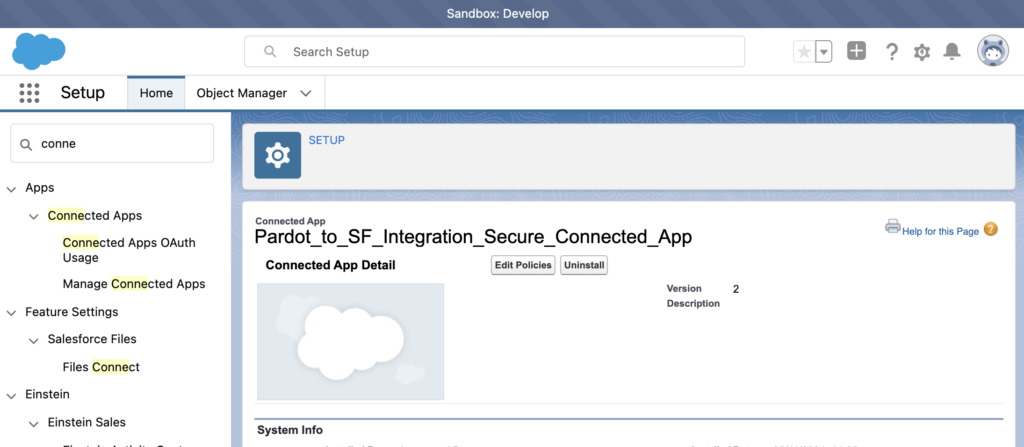
This connected app may cause connector issue if not configured correctly
To learn more about Pardot sandboxes, check out this Trailhead unit or get in touch with one of our Pardot experts today!