



What if you could effortlessly bring all your valuable web content, from blog posts to product documentation, directly into Data Cloud and power your Salesforce applications with it? Nebula can configure your Agentforce agents to directly reference this material and help your customers with it.
Well, Salesforce has just released two new native connectors (currently in Beta) for Data Cloud to connect to websites and index their pages: Web Content (Crawler) and Web Content (Sitemap). Let’s take a look at both and show you how these work within Data Cloud.

What are these connectors?
You have a blogging area on your website and your colleagues spend a lot of time documenting new features, or changes to your products. How can you expose these posts to your customers and internal users more easily?
You have a support portal and knowledge base with support articles and guides to using your products, but it’s hosted off the Salesforce platform. Agentforce can’t directly access this content, but you’d like to offer your customers an agent to help with their issues or enquiries.
With these new connectors, it’s now possible natively within Data Cloud to ingest these website pages, which was previously only available with a Mulesoft Direct integration.
What’s the difference between the Crawler and Sitemap?
Crawler is designed to start from a certain page, extract the content from that page and find all the links to other pages on a website, and then go again, crawling up to 4 levels deep of links to pages. This way, the crawler doesn’t need to know anything about the website before it starts to index it.
Crawl Depth: “The number of levels that are included for ingestion, from the starting URL you provided. For example, if you enter your website’s home page URL and set the crawl depth as 1, the home page and its immediate links are ingested. If the crawl depth is 2, then the home page, its linked pages, and the pages those pages link to are ingested.”
Sitemap, however, doesn’t require hunting for links. A sitemap contains a full list of every page on the site already, indexable by search engines. No hunting for links, they’re all there in XML. (Find out more about sitemaps here: https://developers.google.com/search/docs/crawling-indexing/sitemaps/overview)
Is Crawler any good?
Having attempted to crawl this very site, the main issue we had was the lack of an ‘all posts’ page. Crawler needs to look for links, if there are no links or it’s reached its maximum crawl depth, then pages can get missed. Sites that don’t have a Sitemap are an obvious candidate for Crawler.
What about Sitemap, is that any good?
We had much more success with the Sitemap connector. Our website hosts a sitemap xml file, with links to every published page, along with dates when these pages were last updated. If you want to retrieve all website content and have a Sitemap, then you should use this connector.
Setting up the connectors
Create the Connector
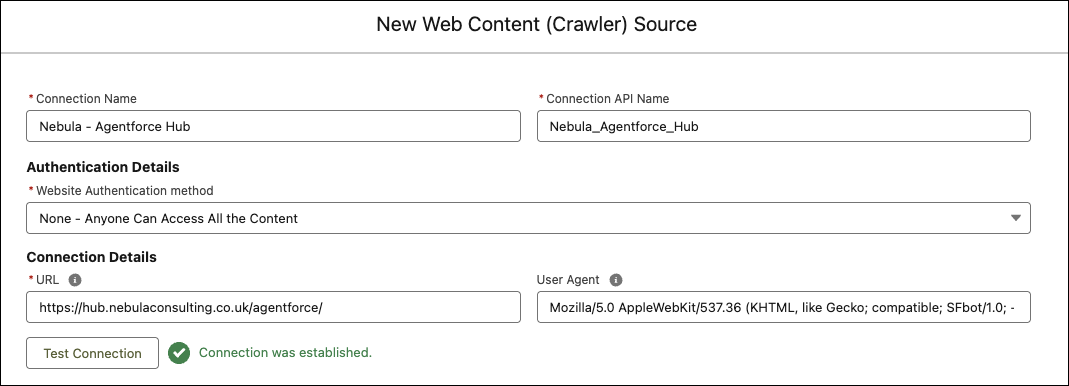
When you create the connector, you must point it to the base URL of the site you want to crawl. In this case, we’re pointing to https://hub.nebulaconsulting.co.uk/agentforce/ which is our site for all things Agentforce.
Configuring the Sitemap is very similar, you set the URL to the location of the sitemap.xml file.
Configuration options
There are a few more configuration options when setting up the Data Lake Object:
- Crawl Depth (Crawler only) as mentioned earlier, this is the number of links followed after the first page. 0 only indexes the home page.
- Included Page Element restricts what the connector sees on the page to a certain element, maybe an article html tag, or div class when the actual content is. You want to only ingest what’s important, and site navigation or footers will use valuable credits during ingestion.
- Included Web Pages will only look for pages matching a part of a url, very useful to only ingest pages of interest, instead of the whole site.
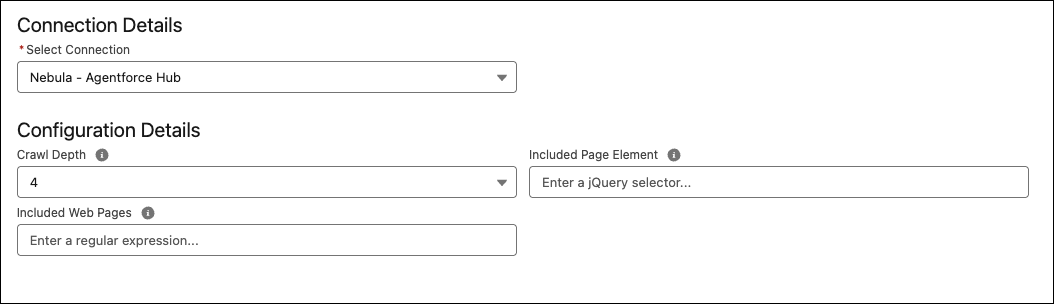
These restrict the connector to only ingest what’s important.
Do the connectors work?
As mentioned already, yes and no. We had limited success with the crawler, mainly down the structure of the site we were ingesting. Out of the two, Sitemap is more likely to ingest everything you expect it to, given it has a full list of all the pages on the site to process.
Any Data Cloud work is use case centric. At Nebula, we work closely with our customers to map their detailed use case and plan together how to deliver value and ROI. The new connectors deliver exciting new capabilities and have become part of our Data Cloud workshops.
These connectors have only just been released. There might still be improvements to come, and can only process html and pdf documents today. We anticipate future enhancements to ingest images, videos or audio.
Ready to start integrating your web content?
If you would like to know more, please get in touch.


